
Download ABC Amber PDF Merger – PDF Merge Tool, Document Consolidation, Mobile Utility
Overview
ABC Amber PDF Merger is a dedicated mobile application designed to consolidate multiple PDF documents into a single, unified file. Its primary purpose is to streamline document management by enabling users to merge various PDFs without relying on complex desktop software. This tool addresses a common pain point for professionals, students, and individuals who frequently handle multiple PDFs—such as contracts, reports, or academic materials—and need them organized in one accessible file.
The app is especially valuable for those seeking a lightweight alternative to Adobe Acrobat, eliminating the need for large software installations. While the developer did not provide additional background information, the app has been available since 2008, suggesting a long-standing presence in the document utility space. Real-world use cases include combining scanned receipts, compiling presentation slides, or merging research papers into a single reference file.
In the broader mobile app ecosystem, ABC Amber PDF Merger fills a niche for productivity tools focused on file manipulation, offering a simple yet effective solution for users who prioritize efficiency and minimal setup.
Key Features & Functionality
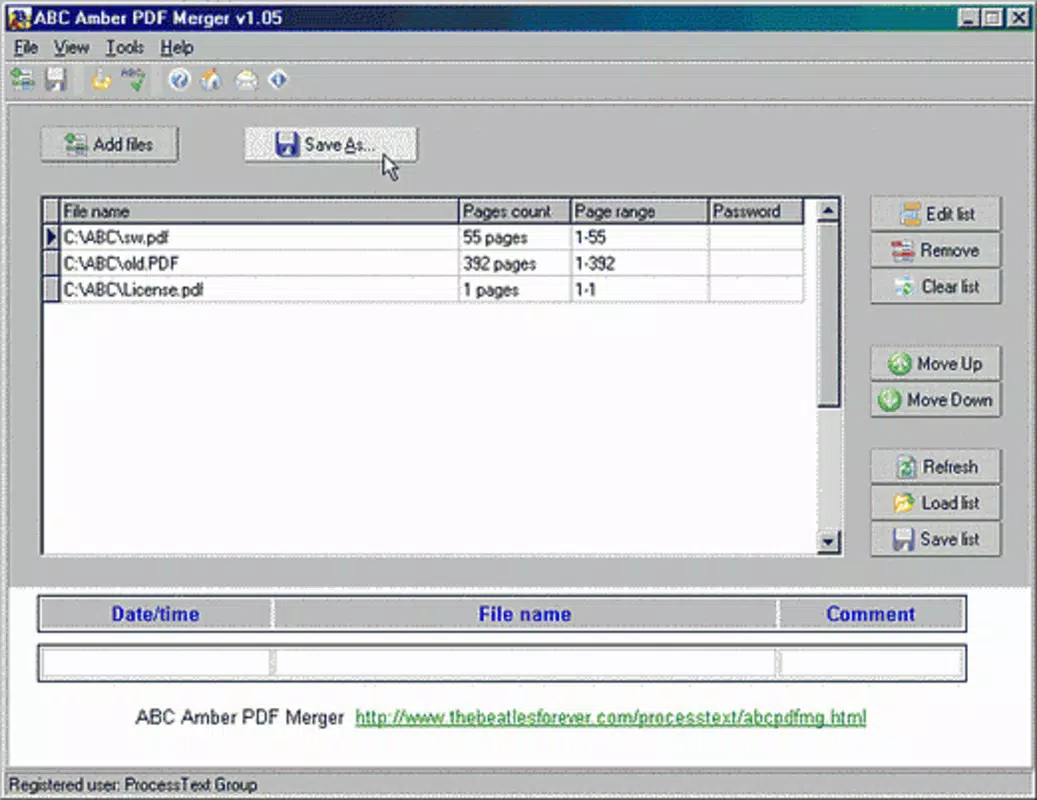
- Easy File Addition: Users can add multiple PDF files for merging with a simple tap on the 'add file' button. The ability to select multiple documents using the Ctrl key allows for efficient batch processing, reducing time spent on file management.
- Simple Process Flow: After file selection, users press the 'O' key to generate a PDF list. This minimalistic workflow reduces cognitive load and ensures that even non-technical users can complete the task without confusion.
- No Adobe Required: The application operates independently of Adobe Acrobat, making it ideal for users who want to avoid additional software dependencies or subscription costs.
- Quick Save Function: Once merging is complete, the 'Save as' feature enables immediate naming and storage of the final document, promoting better file organization and accessibility.
For example, a student preparing a thesis can use the app to combine individual chapter drafts into one master document. A small business owner might merge invoices and receipts into a single file for tax filing. These real-world scenarios highlight the app’s practicality and user-centric design. The focus on speed and simplicity ensures that users achieve their goals with minimal effort, making it a reliable utility for everyday document handling.
Interface, UX & Performance
The interface of ABC Amber PDF Merger is designed with clarity and efficiency in mind. The layout is minimal, with clearly labeled buttons and a logical flow from file addition to final save. Navigation is straightforward, relying on intuitive gestures and keyboard shortcuts—such as pressing 'O' to generate the list—making the app accessible even on smaller screens.
Visual style is functional rather than decorative, prioritizing usability over aesthetic flair. The app maintains responsiveness across different device categories, though specific performance metrics were not provided by the developer. Although the developer did not list formal performance metrics, the app’s design suggests it operates smoothly on mid-to-high-end devices, with minimal lag during file processing.
Stability appears consistent, given the app’s long availability. The user experience is optimized for quick task completion, reducing the risk of errors during merging. Overall, the app delivers a clean, distraction-free environment ideal for focused document work.
Platform Compatibility & Technical Requirements
ABC Amber PDF Merger is available on Android and iOS platforms. The software version is not specified in the provided data, nor are the minimum OS requirements. The file size of the application is also not disclosed.
The developer did not specify minimum OS requirements or compatibility details for different device models. As a result, users should ensure their device meets general system standards for running mobile applications. Compatibility information was not fully disclosed, so installation may vary depending on the device and operating system version.
Users are advised to verify system compatibility before attempting to download or install the app. The lack of detailed technical specifications means that performance on older or low-memory devices cannot be confirmed.
Pros and Cons
Pros
- Efficient merging of multiple PDFs into a single file
- Intuitive interface suitable for users of all experience levels
- Operates without requiring Adobe Acrobat or additional software
- Quick file addition and simple workflow with minimal steps
- Supports batch file selection for faster processing
Cons
- Developer did not provide detailed technical specifications
- Specific OS requirements or compatibility details were not listed
- File size and version information were not disclosed
- No information on cloud integration or export formats beyond PDF
- Limited visual customization options in the interface
FAQ
Is ABC Amber PDF Merger safe to download and install?
The app is designed as a secure utility for merging PDF files. As with any third-party application, users should ensure they download it from a trusted source to avoid potential risks.
Does the app require an internet connection to function?
The app operates offline, allowing users to merge PDFs without needing an active internet connection.
Can I merge PDFs from cloud storage services?
While the app supports local file selection, specific integration with cloud platforms like Google Drive or Dropbox was not mentioned in the provided information.
Is ABC Amber PDF Merger free to use?
The pricing model was not specified. Users should check the app store listing for current pricing details.
How often is the app updated?
Update frequency was not disclosed. The app’s release date is listed as 2008, but no information on recent updates is available.
Final Thoughts
ABC Amber PDF Merger stands out as a dependable tool for users seeking a no-frills solution to merge PDF documents on mobile devices. Its straightforward interface, lack of dependency on Adobe Acrobat, and efficient workflow make it a practical choice for students, professionals, and individuals managing multiple documents. While technical details such as file size, version, and OS compatibility remain undisclosed, the app’s long-standing presence suggests reliability and consistent functionality.
For those who value simplicity and performance in document management, this utility delivers clear value. If you need to consolidate PDFs quickly and securely without installing bulky software, ABC Amber PDF Merger is a solid option. Download ABC Amber PDF Merger now.


